
Last Updated on October 5, 2026
Stop writing new content. Optimize what’s already working in GSC (Google Search Console).
If you have not discovered this free and useful tool – check it out today! It is one way you can submit, track, and optimise your pages in Google.
So, this is how we are going to use GSC to optimise a page on our website:
- Pull page-level queries in Google Search Console
- Sort by highest impressions & lowest CTR
- Audit content for missing subtopics, weak search intent, or keywords
- Fill the context gaps directly in your headings
High impressions mean search engines see relevancy. High CTR comes when you actually answer the user’s explicit query.
Keep in Mind
What is Quality? Google: Quality is the extent to which a person puts effort, originality, talent, skills, and accuracy into creating content.
But Google cannot literally measure “effort, originality, talent” or intention. It can only infer signals that may correlate with them.
For SEO that means: Google doesnt need to know whether you worked hard. It needs to determine whether the result deserves to be shown.
Step 1 and 2: Pages and Keywords
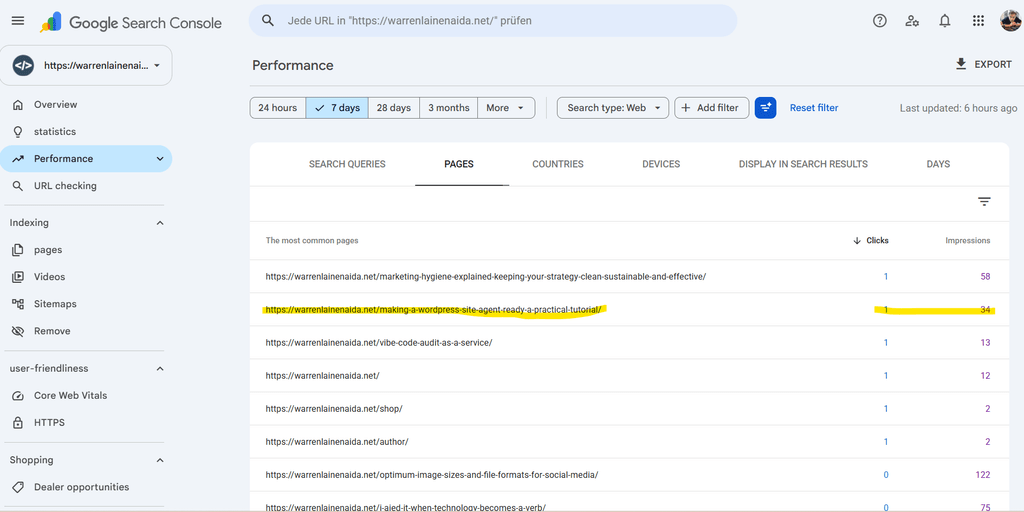
I have accessed my website in GSC, and sorted my pages over the last 7 days.
I see that the page appeared in the SERPs 34 times, but was clicked on only once.
When I look at the Search Queries, I can see the search queries people used that Google found relevant for that page.
Only three in the last 7 days:
- how to make website agent ready, 6 times
- isitagentready, once
- how to use agent and manus environment variables for wordpress, also once.
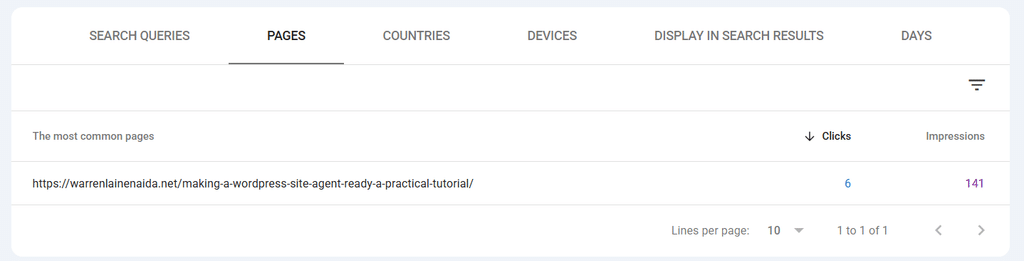
Expanding that to 28 days, I see a much bigger list of search queries.
- how to make website agent ready, 29 times
- isitagentready.com, 3 times
- isitagentready, once
- include link response headers for agent discovery (rfc 8288), once
- how to use agent and manus environment variables for wordpress, once
Step 3: Content Audit
Now I want to take a look at my page: https://warrenlainenaida.net/making-a-wordpress-site-agent-ready-a-practical-tutorial/ and see how these search queries appear in the content – if at all!
These terms do not appear in my article. So it is time to get them added in a natural and useful way. Let’s look at the most likely intent of these queries.
how to make website agent ready
- Informational: Developers or site owners looking for an overview/checklist to make their site accessible to AI agents.
isitagentready.com / isitagentready
- Brand/Tool Navigation: Users looking for the exact tool website or searching for context on what the tool is testing.
- Brand/Tool Query: Broader term for the audit tool.
include link response headers for agent discovery (rfc 8288)
- Error Fix / Exact Audit Output: Users copy-pasting the exact diagnostic string returned by
isitagentready.comwhen their audit fails.
how to use agent and manus environment variables for wordpress
- Technical How-To: Developers looking for specific code examples on handling AI environment variables in WordPress (
wp-config.phpor custom functions).
It appears I am missing out on delivering a good answer to these search queries. I do not mention the tool, and the exact problem solving match is missing.
Step 4: Time to Fix the Problem
Add an “Audit & Validation Tools” Section
I will dedicate a short section or callout box to popular agent readiness scanners.
- Text to integrate: Mention
isitagentready.comdirectly. - Example snippet:“If you test your site using tools like isitagentready.com or isitagentready, you may run into specific recommendations regarding header discovery and agent rules.”
Create a Dedicated Subheading for RFC 8288 Link Headers
I will match the copy-paste search query in a clear subhead: How to Include Link Response Headers for Agent Discovery (RFC 8288).
- Provide a direct PHP snippet for WordPress developers to add to
functions.phpor a custom mu-plugin:
PHP
// Add RFC 8288 Link headers for agent discovery in WordPress
add_action('send_headers', function() {
    header('Link: </.well-known/api-catalog>; rel="api-catalog"', false);
    header('Link: </.well-known/agent-skills/index.json>; rel="service-doc"', false);
});
Address Agent & Manus Environment Variables
I will add a subsection covering how WordPress handles user-agent or environment variable detection (e.g., detecting Manus AI or general agent crawlers via headers or server variables).
- Key topic to answer: How to check for agent context in PHP/WordPress (
$_SERVERheaders or custom environment flags).
Optimize the Title Tag & Meta Description
Finally, I will update the page metadata so it signals both high-level concepts and practical, fix-oriented developer solutions:
- Primary Focus: “How to Make a Website Agent-Ready: WordPress Tutorial & Header Fixes”
- Meta Description: “Learn how to make your WordPress site agent-ready. Fix isitagentready.com audit errors, add RFC 8288 Link response headers, handle environment variables, and optimize llms.txt.”
Wrapping Up
Google Search Console is a free and easy way to optimise your website, page by page, so you get more views and more clicks.
Will my page optimisation work? I will answer that here in a few weeks! See you then.