Last Updated on October 6, 2026
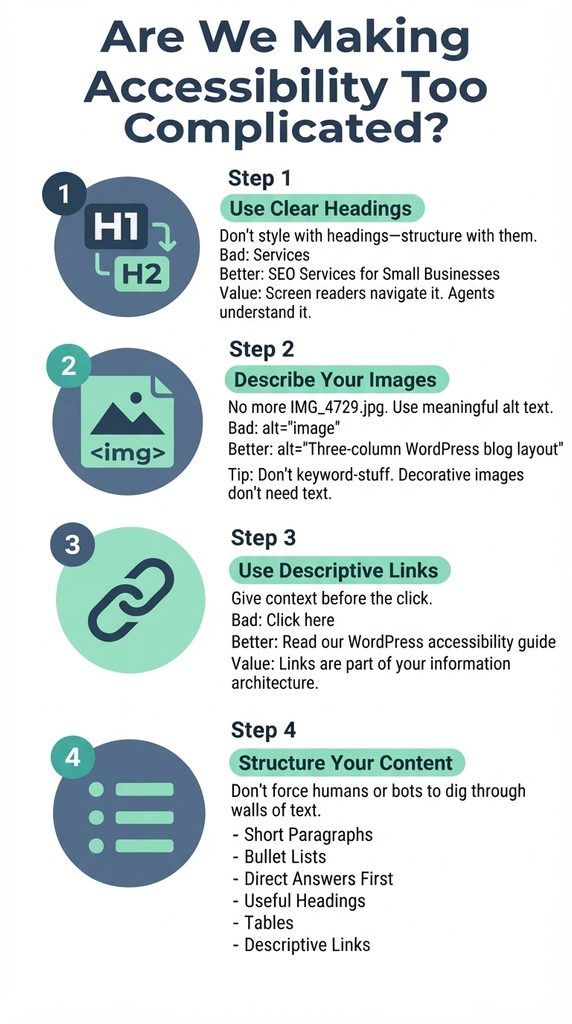
- Are We Making Accessibility Too Complicated?
- TL:DR – 4 Things Your Website Needs to Be Agent-Ready and Accessible – and Your Online Shop
- GreenGeeks Accessible – AI Friendly Website Webinar video and supporting material
- No time to read? Download the Free One Page Audit Checklist
A GreenGeeks Webinar with Warren Laine-Naida
Another Free GreenGeeks webinar!
How accessibility drives AI-readability, SEO, and lower-carbon websites.
With actionable, quick agent-friendliness audit steps!
AI agents (and they are just one of five groups accessing your website) don’t browse your website like a human does; they parse it.
A cluttered, JavaScript-heavy site that’s hard on screen readers is often just as hard on the bots now reading, ranking, and recommending it.
This session breaks down why accessibility, SEO, and AI-readability have quietly become the same job – and what that means for your site’s real carbon footprint. #SEO #AEO #Accessibility
What You’ll Learn in this Webinar:
- Why Accessible Sites Are the Sites AI Agents Actually Understand
- The Hidden Carbon Cost of Bloated, JavaScript-Heavy Pages
- Quick Audit Steps to Improve Rankings, Access, and AI Visibility Together
Other GreenGeek Webinars with Warren
See all of the GreenGeeks Webinars right here: https://www.greengeeks.com/webinars/


Are We Making Accessibility Too Complicated?
Yes.
WordPress said they are bringing out an Agent-friendly theme called “Ipsum”. https://make.wordpress.org/core/2026/09/16/introducing-ipsum-the-new-default-theme/ But, do we need another theme?
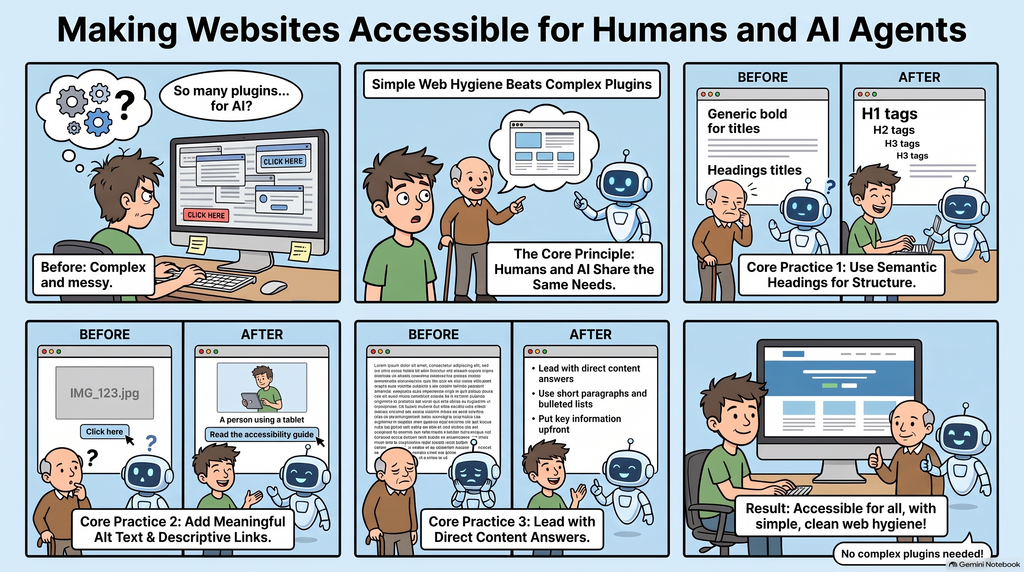
Having an accessible website is not that complicated. The principle is: Clear structure > easier for people to navigate > easier for machines and agents to understand.
Do I Need a Special Theme?
No.
What you need is a simple theme. Elementor is not going to help you here. Generate Press is a good start. Maybe Ipsum too.
There are four things you can do now, that will positively impact your website’s usefullness for people and bots/agents.
The Simple Test
Look at your website and ask: Can a person understand it without struggling?
If yes, you’re already doing a lot of the work required to make it understandable to an agent.
No magic, just good web hygiene.
TL:DR – 4 Things Your Website Needs to Be Agent-Ready and Accessible – and Your Online Shop
You don’t need an AI plugin to make your website more useful to AI agents. Juststart with the basics.
The things that make a website easier for people to understand often make it easier for machines to understand too.
Clear structure, meaningful language and accessible HTML are good for SEO, accessibility and AI visibility.
1. Use Clear Headings
Don’t use headings because they look good. Use them to structure the page.
One H1. Then H2s for the main sections. H3s for sections within those sections.
Bad:Services
Better:SEO Services for Small Businesses
A person can scan it. A screen reader can navigate it. An agent can understand what the section is about.
That’s the point of semantic HTML: give the content meaning, not just appearance.
2. Describe Your Images
Don’t leave important images as IMG_4729.jpg.
Give meaningful images useful alt text.
Bad:alt="image"
Better:alt="Three-column WordPress blog layout"
Don’t stuff keywords into alt text. Describe what matters.
And if an image is purely decorative, it doesn’t need a description.
Simple. Accessible. Useful to machines too.
3. Make Navigation and Links Descriptive
“Click here” tells nobody much.
Try: Click here > Read our WordPress accessibility guide
The second link tells you what you’re going to find before you click it.
Make your navigation just as clear:
- Use descriptive menu labels
- Keep navigation consistent
- Give buttons clear names
- Use descriptive link text
- Make the path between related pages obvious
That’s useful for people using screen readers, people scanning a page and machines trying to understand relationships between pages.
Your links and navigation are part of your information architecture. Make them count.
4. Make Important Information Machine-Readable
Don’t make people – or machines – work out what important information means.
Use clear HTML and, where appropriate, structured data to identify things such as:
- products
- services
- prices
- dates
- locations
- organizations
- events
For example, don’t just write:
SEO consultation – €500
Use appropriate markup so that the page clearly identifies the service and its price.
This isn’t about adding an AI plugin or creating a special AI version of your website. It’s about making important information explicit and machine-readable.
People should be able to understand your content. Machines should be able to identify what that content represents.
And What About Online Shops?
Make product data machine-readable. Use Product and Offer markup with price, currency, availability, brand and GTIN, plus shipping and return details.
Google says this markup can make a product eligible for merchant listings, which can show price, availability, and shipping and return information. Only mark up reviews that are real. More: Google’s merchant listing guide
Keep stock, shipping and returns accurate and findable. Show price and stock in the HTML the server sends, and put delivery and return terms on the product page, not only on a policy page. Check that caching doesn’t serve stale stock. More: WooCommerce: getting your store ready to sell through AI
Make browsing and checkout accessible. Variant selectors, filters and form fields need labels and keyboard access. Use descriptive image alt text such as colour and material, and optimised images. Don’t let bot protection block legitimate shoppers.
In the EU, the European Accessibility Act has applied since 28 June 2025 and covers e-commerce sold to consumers, with an exemption for microenterprises under ten people and €2 million turnover. More: EAA explained
Test it. Run your top product page and checkout through isitagentready.com and PageSpeed Insights. Every quarter, search for your products in ChatGPT, Gemini and Perplexity, and fix anything wrong or missing.
Shopify
- Agentic Storefronts were switched on by default for eligible US merchants on March 24, 2026. EU stores should check eligibility in their admin. More: intelligentecom
- The fields AI platforms read are title, description, images, type, vendor, collections, tags, barcode and variant option names. Complete store policies and FAQs help too. More: shopify
- You can’t opt out of Shopify Catalog itself, and optimising doesn’t guarantee placement, ranking or exact wording. More: shopify
- Use a current theme, and remove apps that add duplicate schema or heavy scripts.
Shopify: optimizing your products for AI platforms
WooCommerce
- WooCommerce’s own checklist: real-time stock, shipping and returns in product data, Stripe for WooCommerce as the route to ACP, and the Google for WooCommerce feed for Merchant Center. Stores running WooPayments can’t use the Stripe route yet, and rollout is US-first. More: woocommerce
- As of late August 2026, WooCommerce doesn’t document native UCP support. Third-party plugins exist but aren’t official support, so test them on staging. More: universalcommerceprotocol
- Keep your theme and plugins lean (a block theme and the Cart and Checkout blocks), and make sure only one plugin outputs Product schema.
WooCommerce: selling through AI · UCP support status
last verified: October 2026
GreenGeeks Webinar: Marketing Hygiene Matters but Can People and Search Agents Read Your Website?
“Marketing hygiene means making your website content extractable – by people, assistive tech, crawlers, and AI agents.”
Who or What is Accessing my Website?
Search bots (crawlers), people, screen readers, AI/LLM crawlers, and AI agents all access websites very differently. They request pages over HTTP, but what they receive, how they process it, what they prioritize, and what they do with the result diverge sharply.
A site that is hard for one is often hard for others – especially cluttered, heavily JavaScript-dependent pages with poor semantic structure.
Traditional search engine bots / crawlers (e.g., Googlebot, Bingbot)
These are automated programs whose main job is discovery > fetch > render (sometimes) > parse > index.
- Discovery: They find URLs via links from other pages, sitemaps, Search Console submissions, and previous crawls.
- Fetch: They send HTTP requests (respecting robots.txt for most reputable ones). Googlebot currently fetches up to ~2 MB of the response for most files (higher for PDFs). They check status codes, headers, and content.
- Rendering: Modern Googlebot uses a headless Chrome-like renderer (Web Rendering Service). It executes JavaScript and CSS so it can see content that only appears after client-side rendering. Many other crawlers (and most AI training crawlers) do not render JavaScript fully or at all.
- Parsing & indexing: They extract text, links, structured data (JSON-LD, microdata), headings, titles, meta descriptions, images (with alt text), etc. The goal is to build a searchable index for ranking and retrieval.
- Behavior traits: Polite rate limiting (crawl budget), follow robots.txt and meta robots directives, prefer mobile-first crawling in many cases, recrawl based on importance and change frequency. They do not interact like users (no form filling, no purchases, no prolonged sessions).
Other bots exist for images, video, ads, shopping, news, etc., each with specialized behavior.
People (human users)
Humans experience the rendered visual + interactive page through a full browser.
- They load the page (HTML + CSS + JS + images + fonts + media).
- The browser builds the DOM, applies styles, runs scripts, and paints the visual layout.
- Users see design, colors, layout, images, animations, and interactive elements. They scroll, click, hover, type, fill forms, watch videos, and navigate by visual cues, muscle memory, and intent.
- They rely on visual hierarchy, branding, trust signals, and usability. Content that is buried behind clicks, tabs, infinite scroll, or heavy JS may still be reachable if the interface is clear.
- Analytics, cookies, personalization, and A/B tests are typically designed around human sessions.
Humans are the original audience most sites are optimized for, but they are no longer the majority of traffic on many sites.
Screen readers (and other assistive technologies)
Screen readers (NVDA, JAWS, VoiceOver, TalkBack, etc.) convert the page into speech or braille for people who are blind or have low vision. They do not “see” the visual design.
- Browsers build an accessibility tree from the DOM. This tree exposes roles (button, heading, link, landmark), names, states (checked, expanded, disabled), relationships, and properties.
- Semantic HTML (<h1>–<h6>, <nav>, <main>, <button>, proper form labels, alt text, ARIA where needed) is critical. Decorative images should be ignored; interactive elements need clear names and states.
- Users navigate by keyboard shortcuts: headings (H key), landmarks, links, form fields, lists, etc. They often move linearly or jump by structure rather than visual position.
- Poor semantics, missing labels, inaccessible custom components, or content only present after complex JS interactions make the page unusable or exhausting.
- Screen readers operate on the accessibility tree (and sometimes DOM details). Visual clutter, missing structure, or non-semantic markup that confuses the tree also confuses them.
This is why accessibility and clean markup matter so much: the same issues that hurt screen-reader users often hurt automated parsers.
AI/LLM crawlers and training bots (e.g., GPTBot, ClaudeBot, PerplexityBot, Common Crawl variants, Google-Extended)
These primarily collect content for model training, retrieval-augmented generation (RAG), or grounding answers in search/chat products.
- Many perform simple HTTP fetches of the initial HTML and do not fully execute JavaScript the way Googlebot does. Client-side-only content is frequently invisible.
- They extract text, structure, and sometimes other assets. Some convert pages to cleaner formats (markdown-like) for token efficiency.
- They often check robots.txt (though enforcement and respect vary) and may look for emerging signals such as /llms.txt (a curated, token-efficient site summary for AI systems).
- Goals differ from classic search: bulk text for training data, fresh content for answer engines, or citations. They may prioritize different content types and have different politeness or blocking behaviors.
- Result: a JavaScript-heavy single-page app that shows almost nothing in the initial HTML is often poorly understood or ignored by many of these bots.
AI agents (agentic systems, browser-using LLMs, task-oriented agents)
This is the newest and most varied category. Agents act on behalf of a user to achieve goals (research, compare products, fill forms, book something, extract structured info, etc.).
They access sites in several ways, often hybrid:
- Raw HTTP + HTML/markdown parsing: Fast, cheap, no JS execution. Good when the server sends meaningful content. Many agents try this first.
- Headless browser / full rendering: They load the page like a browser, execute JS, and then work with the rendered DOM, accessibility tree, or both. Some also take screenshots and use vision models.
- Accessibility tree + DOM reading: Increasingly common. The accessibility tree (the same structure screen readers use) gives roles, names, and interactive elements cleanly and with far fewer tokens than the full DOM or a screenshot. Agents can identify buttons, forms, and content structure more reliably this way.
- Vision / screenshot-based: Some systems (or modes) capture the visual page and reason about pixels + text. This is more expensive and error-prone for precise interaction but handles visual-only cues.
- Interaction: Unlike pure crawlers, agents can click, type, scroll, submit forms, handle multi-step flows, and adapt. They plan, observe, act, and re-observe.
- Discovery aids: robots.txt, sitemaps, /llms.txt, structured data, APIs, and emerging protocols (MCP-style tool exposure, content negotiation for markdown, etc.) help agents find and use content efficiently.
Because many agents lean on the accessibility tree or clean semantic HTML, sites that are inaccessible to screen readers are frequently also hard for agents. Heavy client-side rendering without server-rendered fallbacks, missing labels, non-semantic custom UI, and anti-bot challenges that block automated browsers all create friction.
How they relate (and why the opening quote is accurate)
- People experience the full visual + interactive result.
- Screen readers experience a linearized, semantic, structured version via the accessibility tree.
- Search bots (especially Google) try to approximate the rendered page for indexing, with resource and size limits.
- AI crawlers often get a more limited, text-focused view and frequently skip full JS rendering.
- AI agents sit between crawlers and users: they may render and interact, but they still rely heavily on parseable structure, semantics, and the accessibility tree. Cluttered markup, missing semantics, or content that only appears after heavy client-side work hurts them the same way it hurts screen readers and many bots.
Practical Website Hygiene for site owners
What is hard for screen readers and traditional crawlers is usually hard for the new generation of AI agents and LLM systems as well.
- clean, semantic HTML
- proper headings and landmarks
- meaningful alt text and labels
- server-rendered or progressively enhanced content
- structured data
- a sensible robots.txt
- and emerging AI-friendly signals (sitemaps, llms.txt, clear APIs)
Everything that accesses your site – humans, assistive tech, search crawlers, training bots, and autonomous agents – ultimately depends on the HTTP response and the structure you expose. Optimizing for clarity and semantics benefits the whole spectrum.
Core thesis: Accessibility = AI-readability = SEO
Multiple 2026 sources now confirm our core point:
AI agents don’t “browse” like humans; they parse structured, semantic layers of your site – the same layers screen readers use.
In practice, that means:
- Accessible sites are the sites AI agents actually understand. AI agents (ChatGPT Atlas, Perplexity, Claude, etc.) rely on the browser’s accessibility tree built from semantic HTML, headings, ARIA, landmarks, and form labels.
- Cluttered, JavaScript‑heavy pages hurt both humans and bots. Heavy client‑side rendering, unlabelled interactive elements, and skipped heading levels make content harder to extract for LLMs and screen readers alike.
- The same fixes improve rankings, access, and AI visibility together. Clean semantic structure, proper labels, and stable DOMs help traditional SEO, accessibility compliance, and Generative Engine Optimization (GEO/AEO) simultaneously.
Why accessible sites are AI‑friendly
- AI agents read the accessibility tree, not your visual design. OpenAI and other vendors confirm agents navigate via the structured semantic layer exposed to assistive tech.
- Screen‑reader‑friendly markup is LLM‑friendly markup. Alt text, heading hierarchy, landmark roles, and descriptive link text give unambiguous signals about what content is and where it belongs.
- Sites that fail accessibility checks see lower agent task completion. Research shows agents complete more tasks on sites passing contrast, label uniqueness, and keyboard reachability checks.
The hidden carbon cost of bloated, JS‑heavy pages
- JavaScript costs twice: transfer energy plus device execution energy. Cutting JS reduces emissions across the whole chain and speeds up pages.
- Client‑side energy can be 2–5× higher for JS‑heavy SPAs vs server‑rendered HTML per page view.
- Page weight drives CO₂. A 5MB page generates roughly 5× the carbon of a 1MB page; long JS execution times increase client‑side energy use.
- Typical breakdown: ~80% media, ~15% JavaScript, ~5% server code for many pages – so trimming JS and media yields the biggest carbon gains.
- Framework choice matters. Astro emits ~0.005g CO₂/page vs React ~0.015–0.025g and Angular up to ~10× Astro per page view.
Quick audit steps to improve rankings, access, and AI visibility
- Use this short checklist on your top 5 pages (home, main service/product, pricing, contact/booking, top landing page).
- No time to read? Download the One Page Checklist PDF.
- https://isitagentready.com ( pagespeed.web.dev checks your site now too) check your website for agentic access.
Run an accessibility tree audit (10 minutes/page)
- In Chrome DevTools: Elements > Accessibility tab.
- Verify:
- One H1 that matches page intent; no skipped heading levels (H1>H2>H3).
- Landmarks present: header, nav, main, footer (and aside if used).
- All interactive elements (buttons, links, icons, form fields) have descriptive labels or aria‑labels.
- Alt text on meaningful images; decorative images marked appropriately.
- Link text is descriptive (avoid “click here”).
Check rendering mode and JS weight
- Use Lighthouse (Chrome DevTools) to identify:
- Unused JavaScript and large bundles.
- Opportunities for server‑side rendering or static generation to reduce client execution.
- https://pagespeed.web.dev
- Targets often cited in 2026 guidance:
- Initial JS bundle under 150–200KB (gzipped).
- Page weight under 1MB where possible.
Add/validate structured data and agent signals
- Implement JSON‑LD for key entities: Organization/LocalBusiness, Product/Service, FAQPage, Article as relevant.
- Consider an
ai-agent.jsonmanifest at/.well-known/to guide agents to critical pages. - Segment
robots.txtfor training crawlers vs search bots vs agents if you have specific policies. - https://isitagentready.com
Offer a Markdown alternate for your priority pages (optional, low‑risk)
- Serve a Markdown version of each of the 5 priority pages, either as a static
.mdfile or via content negotiation (anAccept: text/markdownrequest header returning converted Markdown for the same URL – the approach Cloudflare shipped in Feb 2026). - Add discovery so agents can find it:
<link rel="alternate" type="text/markdown" href="https://warrenlainenaida.net/marketing-hygiene-ai-accessibility.md">in the page<head>, per the llms.txt v2 proposal (Aug 2026). - Keep the
.mdroutenoindexed rather than a separately indexable page, to avoid duplicate‑content dilution of the original. - Treat this as speculative infrastructure, not a ranking lever – Google has said Markdown doesn’t affect Search rankings, and real‑world crawler logs so far show most AI bots rarely request the Markdown version or use content negotiation at all. Worth having in place, but don’t expect a visibility bump from it yet.
Measure carbon and set a budget
- Run a quick grams‑per‑view estimate with a website carbon calculator, then refine with Lighthouse byte‑weight and unused JS reports.
- Adopt a target such as 0.5g CO₂ per page view (Sustainable Web Design model) and monitor quarterly.
- https://www.websitecarbon.com
Prioritize fixes that move multiple needles
Focus first on:
- Heading hierarchy and landmark roles (SEO + a11y + AI parsing).
- Form labels and button semantics (agent task completion + WCAG).
- Removing unused JS and third‑party tags (speed + carbon + crawl efficiency).
Useful References and Further Reading
- AI agents and the accessibility tree: WebKing (2026) explains why agents read your accessibility tree, not your design, with concrete markup checks. webking
- How AI Agents See Your Site llmranks.io
- Accessibility as an SEO/AEO signal: Accessibility.works (2026) frames WCAG compliance as the foundation for GEO/AIO/LLMO. accessibility
- Carbon of JavaScript frameworks: Should I Use This Framework (2026) provides CO₂/page data by framework and optimization guidance. shouldiusethisframework
- Sustainable Web Design targets: SiteGrade and related 2026 guides outline 0.5g/page targets and practical reduction tactics. sitegrade
- Warren Laine‑Naida on accessible SEO and AI: Podcast episodes and talks emphasize “good HTML, clear headings, structured content” as the core of AI‑optimized SEO. stunningdigitalmarketing
- Let People and Bots Access Your Website: Whether machines can access, understand, find, and act on it now decides whether people show up at all. (2026) linkedin.com